WebGL Basics
WebGL is a Javascript API for rendering 3D graphics within web browsers. Currently there are two major versions: WebGL 1.0 and WebGL 2.0.
WebGl 1.0 is based on OpenGL ES 2.0 (OpenGL for Embedded Systems), while WebGL 2.0 is based on OpenGL ES 3.0.
The browser support statistics for each WebGL version could be found at WebGL Stats.
Big Picture
To understand how WebGL works, we need to start from the big picture. Modern computing devices have multiple processors and different types of memories working together to accomplish graphics rendering. These components are shown below:
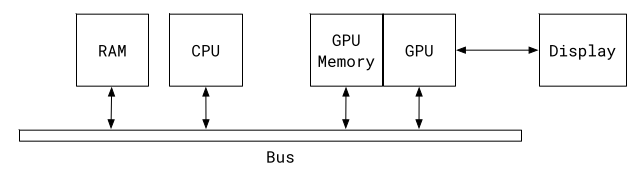
RAMstores our javascript program and dataCPUruns these programsGPUrenders 3D graphicsGPU Memoryis a separate memory system designed forGPUto store and retrieve rendering related 3D graphics data.
If our program wants to render a geometry shape, it first needs to upload the geometry vertices
and color information to the GPU Memory and then calls a shader Program. This shader Program runs on GPU and
it tells the GPU how to draw this geometry shape with the uploaded geometry data.
In summary, javascript program runs on CPU and it creates a shader program to run on GPU.
This shader program is responsible for graphics rendering and is written in a language
called OpenGL ES Shading Language.
Graphics Pipeline
To understand how shader program works, it’s important to know what is graphics pipeline.
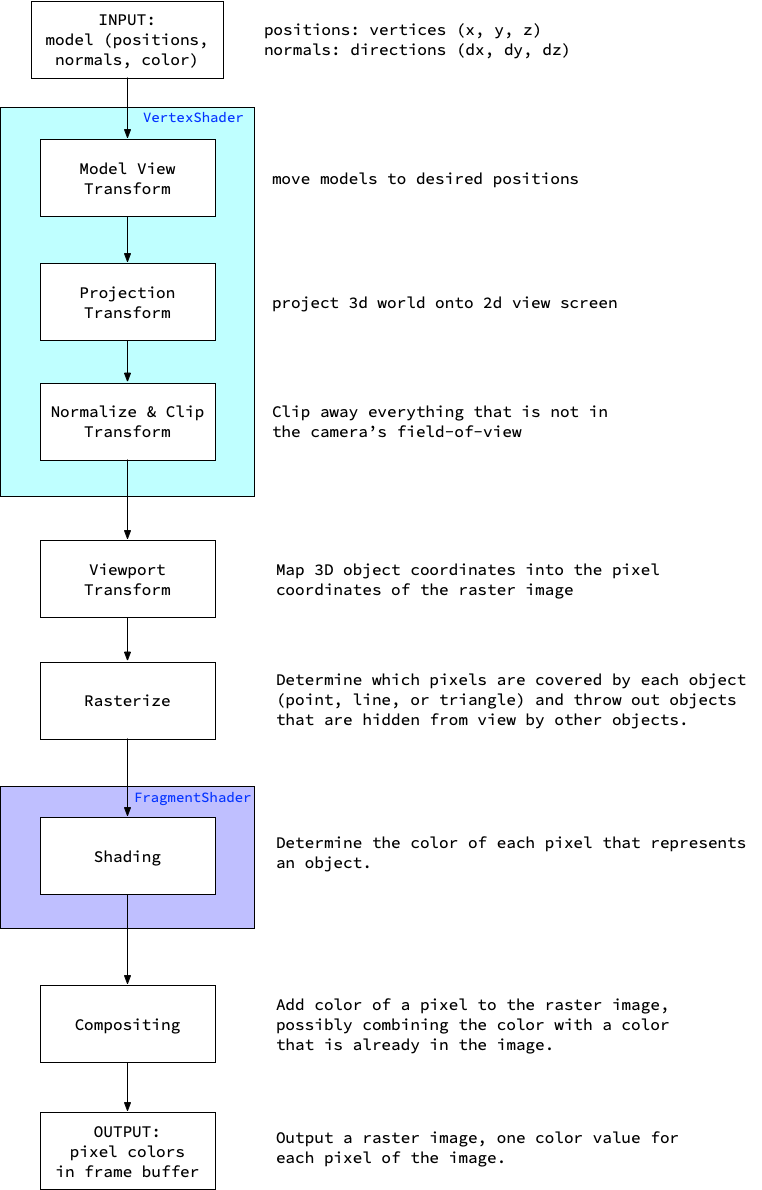
As we can see in the diagram, there are two types of shader program:
Vertex Shader, which manipulates model vertices, e.g. movement, rotation, projection, etc;Fragment Shader, which calculates color of each pixel;
There is one thing to keep in mind here, the vertex shader program runs like this:
for (vertex in all_vertices) {
  call_vertex_shader_program(vertex);
}
and the fragment shader runs like this:
for (pixel in all_pixels) {
  call_fragment_shader_program(pixel);
}
You may be wondering, is it too slow if we run the same program for each of the vertex and pixel?
Yes, that’s why GPU is invented. GPU is designed to run programs in parallel. Suppose our GPU
has 1000 cores, the speed of execution for all programs could be at least 1000 times faster than one CPU core.
In this scenario, memory access speed is also critical to performance, so engineers add a special designed
memory system for fast access. And when we call shader programs, data should be uploaded to the GPU
memory first.
Our model is described in points (x,y,z), lines and triangles. The job of the graphics pipeline is to
map these geometry primitives in 3D space onto the surface of our display plane in 2D space, and to give
each pixel an appropriate color to make objects in the rasterized 2D image look like a 3D object. In order
for our brain to believe these rendered objects are in 3D space, the colors assigned to each pixel should follow
laws of light in physics.
WebGL Coordinate System
Before dive into code details, we need to understand the coordinate system of WebGL.
Shader
Let’s start programming with the WebGL API now.
In the rest of the article, our WebGL shader examples will be
implemented using TWGL.js which is a tiny wrapper API around the original WebGL API.
And shader code will be written in GLSL ES 1.00 of WebGL 1.0.
This is a tiny exmaple copied from TWGL tiny example.
In the above example, there are some built-in variables in Vertex Shader and Fragment Shader.
In Vertex Shader:
- Outputs:
vec4 gl_Position: position(x, y, z, w)inclip coordinates.xandyare in the range of[-1.0, +1.0], represents location in the viewing window;zis in the range of[-1.0, 1.0], represents the distance from the camera;wis1.0in orthogonal projections, or perspective divide value in perspective projections;
In Fragment Shader:
-
Inputs:
vec4 gl_FragCoord: position(x, y, z, w)afterViewport Transform. The(x, y)value is the location of pixel on the image to be rendered. Thezvalue is the distance from the camera.(x, y)is in the center of the pixel.
-
Outputs:
vec4 gl_FragColor: a(r,g,b,a)color value for the current pixel.
3D Math
Lights and Colors
TO BE CONTINUED …